A wireless sensor network (WSN) is a wireless network consisting of spatially distributed autonomous devices using sensors to cooperatively monitor physical or environmental conditions, such as temperature, sound, vibration, pressure, motion or pollutants, at different locations.The development of wireless sensor networks was originally motivated by military applications such as battlefield surveillance. However, wireless sensor networks are now used in many civilian application areas, including environment and habitat monitoring, healthcare
applications, home automation, and traffic control.
While the term wireless network may technically be used to refer to any type of  computer network that is wireless,the term is most commonly used to refer to a telecommunications network whose interconnections between nodes is implemented without the use of wires, such as a computer network (which is a type of communications network). Wireless telecommunications networks are generally implemented with some type of remote information transmission system that uses electromagnetic waves,such as radio waves,for the carrier and this implementation usually takes place at the physical level or "layer" of the network.
1)Microsoft Silverlight
Microsoft Siverlight is a cross-browser,cross-platform,and cross-device plug-in for delivering the next generation of .NET based media experiences and rich interactive applications for the Web.
Publisher-Microsoft Corporation 2)Dotnet FX
This is a program from Microsoft that is related to the .NET technology, and dotnetfx.exe is a process belonging to Microsoft Windows which updates the .NET technology interface. This is a operating system core component update and should not be terminated unless suspected of causing problems.
Publisher-Microsoft Corporation
http://www.microsoft.com/beta/downloads/Default.aspx
3)Free Download Manager
Free Download Manager is a powerful,easy to use and absolutely free download accelerator and manager.Moreover,FDG 100% safe,open-sourse software distributed under GPL license.
 4)PDF Creator
PDFCreator easily creates PDFs from any Windows program.Use it like a printer in Word,StarCalc or any other Windows application.
 5)VLC Media Player
VLC media player is a highly portable multimedia player for various audio and video formats (MPEG-1,MPEG-2,MPEG-4,DivX,mp3,ogg,..) as well as DVDs VCDs, and various sreaming protocols.It can also be used as a server to stream in unicast or multicast in IPv4 or IPv6 on a high bandwidth network.

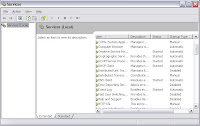
The Services utility is included in all versions of Windows XP and is hidden away. Do the following to disable a service using the Services utility:
1. Click the Start Menu and select Run. In the text box, type services.msc and click OK. This will start the Services utility.
2. Now that you are in the Services utility, you will see a list of a lot of services on your computer. First, you will need to stop the service that you want to disable. Right-click the service name and select Stop on the pop-up menu.
3. When the service is stopped, right-click the service again and select Properties. Located on the General tab, look for the Start up Type drop-down box. Click the arrow on the drop-down box and select Disabled.
4. Click the OK button and from now on, the system will not start the service any more during boot, speeding up your system start.
 computer network that is wireless,the term is most commonly used to refer to a telecommunications network whose interconnections between nodes is implemented without the use of wires, such as a computer network (which is a type of communications network). Wireless telecommunications networks are generally implemented with some type of remote information transmission system that uses electromagnetic waves,such as radio waves,for the carrier and this implementation usually takes place at the physical level or "layer" of the network.


